
Installation
The Universal8 is a DIN-rail device (MDRC) for the electrical cabinet. It mounts on a 35 mm rail (EN 60715).
Connections
- Outputs 1-8: the eight relay outputs, on screw terminals (0.2-2.5 mm², torque 0.4 N·m). Outputs 1-6 are on the top edge, outputs 7-8 on the bottom edge.
- KNX bus: the red/black bus terminal on the bottom edge (− +).
For the output ratings and load types, see the Datasheet.
Mounting and wiring
- Clip the device onto the DIN rail.
- Wire your loads to the output terminals. One relay is one output; some functions use several relays per channel (a Curtain AC channel uses two, a Curtain DC channel four), so plan the wiring together with the function you assign in ETS.
- Connect the KNX bus to the bus terminal.
WARNING
Check the load connections and the ratings of the connected equipment before switching on, in particular for shutter drives. Incorrect settings can damage the load or cause it to operate incorrectly.
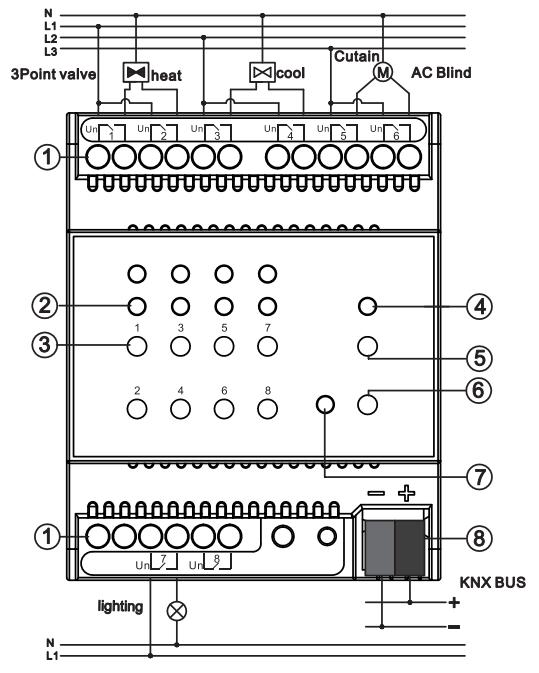
- 1Output terminals. The symbols above each terminal block show the wiring for that output type.
- 2Status LEDs for the outputs, one above each button
- 3Manual operation buttons for outputs 1 to 8
- 4Man./Auto. status LED
- 5Man./Auto. switch button
- 6Programming button
- 7Programming LED
- 8KNX bus connection terminal
Mixing DC blinds with AC loads
When a block of channels drives a DC blind, the neighbouring channel cannot carry an AC load:
- If channels 1-4 drive a DC blind, channel 5 must not carry an AC load.
- If channels 5-8 drive a DC blind, channel 4 must not carry an AC load.