
Installation
The WiserPort can sit on a shelf or inside your electrical cabinet. Place it within reach of your network and on the same local network as your Feller Wiser WLAN Gateway.
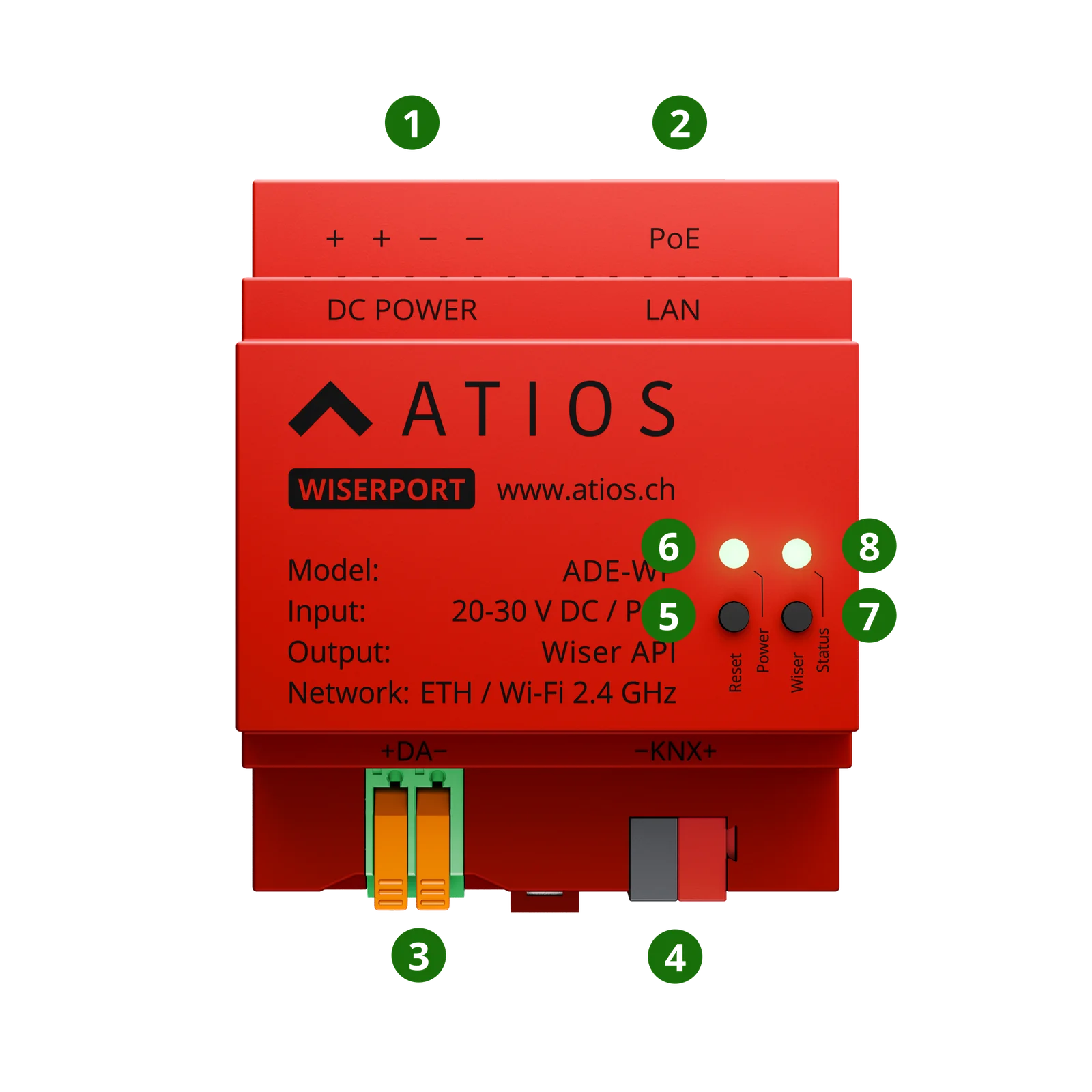
Connections, buttons and LEDs
| Nr. | Component | Description |
|---|---|---|
| ① | DC POWER | 20-30 V DC input |
| ② | LAN / PoE | Ethernet with 802.3af Power over Ethernet |
| ③ | DALI (+DA−) | DALI bus terminals, available after future firmware update |
| ④ | KNX (−KNX+) | KNX bus terminals, available after future firmware update |
| ⑤ | Reset Button | Reboot, factory reset, KNX programming mode, safe mode |
| ⑥ | Power LED | System status |
| ⑦ | Wiser Button | Pair the WiserPort with a Feller Wiser WLAN Gateway |
| ⑧ | Wiser Status LED | Wiser Gateway connection status |
Power
Power over Ethernet (PoE)
Use the LAN port to power the device over the network cable. No separate power supply is needed. PoE 802.3af is supported.
External DC power supply
Connect a 20-30 V DC power supply to the DC POWER terminals.
WARNING
Do not connect PoE and external DC power at the same time. Use only one power source.
Network connection
Ethernet (recommended)
- Connect an Ethernet cable to the LAN port
- If you are not using PoE, also connect a 20-30 V DC power supply
- The device receives its IP address automatically via DHCP
- Check your local network to find the device IP address
Wi-Fi
- Power the device with a 20-30 V DC supply
- Connect to Wi-Fi through the Web Interface
For detailed Wi-Fi configuration, go to Network Settings.
Prerequisite: Feller Wiser WLAN Gateway
The WiserPort requires a Feller Wiser WLAN Gateway on the same local network. Before you configure the WiserPort:
- Make sure your Feller Wiser WLAN Gateway is installed and powered
- Confirm that your Wiser devices (lights, blinds, thermostats) are commissioned and working in the Feller Wiser Home app
Accessing the Web Interface
Once your WiserPort is connected and has an IP address, open the Web Interface.